Descripción
The Divi 5 theme built for SaaS and app websites
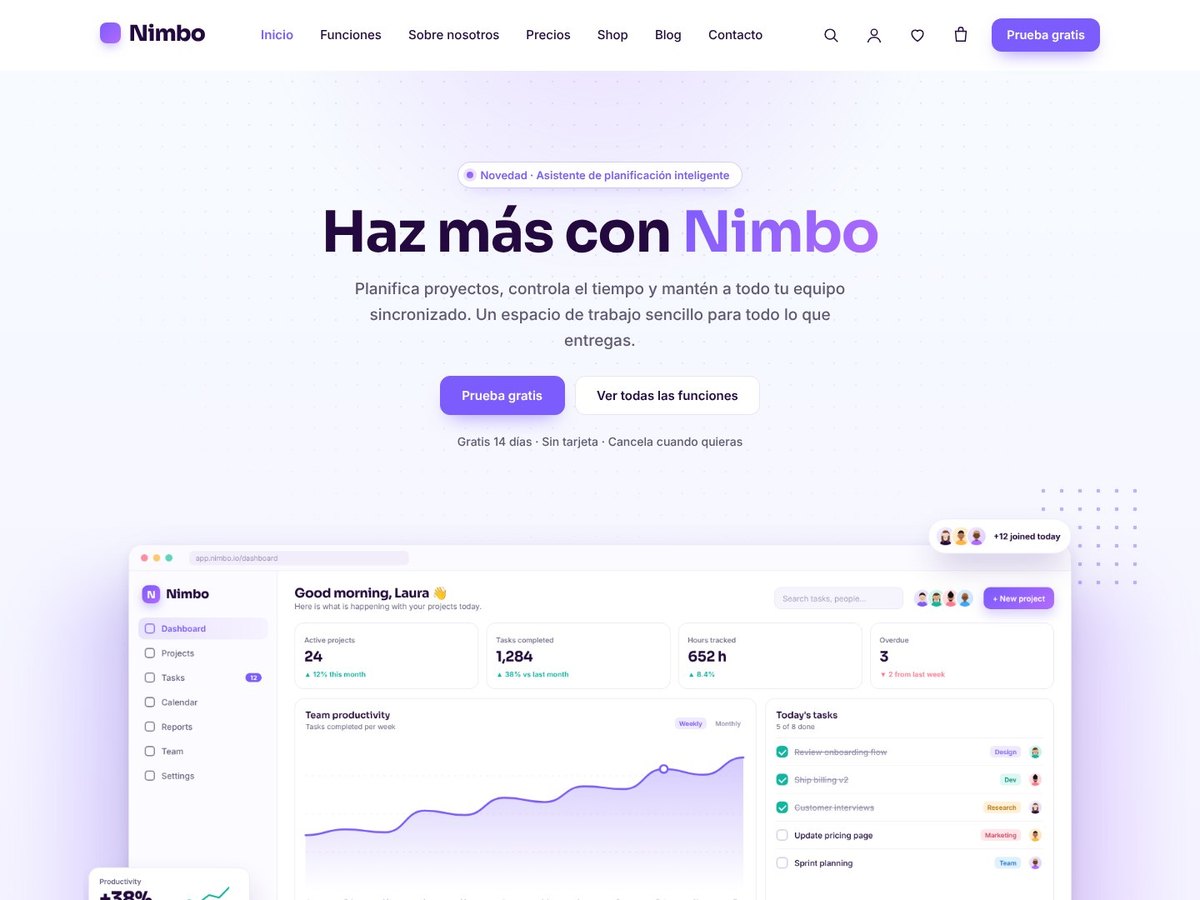
UnikaWeb SaaS is a Divi 5 child theme for software products, apps and startups. It has a bright, modern look with gradient highlights, app screenshots, soft waves and clean cards: the kind of website that makes a product look trustworthy from the first scroll.
You don’t build anything by hand. When you activate it, it creates every page, the menus and the shop template. With one more click it imports the demo: products, blog posts and all the page illustrations in your Media Library.
What it does for you on activation
- Creates Home, Features, About us, Pricing, Contact, Blog, Shop, Wishlist, Cart, Checkout and My account, already designed as native Divi 5 pages.
- Adds the 404, Coming soon and Maintenance pages, also made with Divi.
- Creates the Shop and categories template in the Divi Theme Builder.
- Sets up the main menu, the Company and Help footer menus, the home page and the blog.
- Takes you to its panel, where you import the demo with one click and remove it with another. Your pages go back to how they were.
Pages that sell your software
- Home: hero with your app screenshot and two buttons, customer logos, feature cards, analytics and kanban sections, key figures, pricing, testimonials, FAQ, featured products, latest posts and a final call to action.
- Features: 12 feature cards, a workflow section, and security and integrations blocks.
- About us: your story, key figures, values and a team section with 8 members.
- Pricing: three plans with a highlighted one, a monthly / yearly switch, a comparison table and billing questions.
- Contact: contact details, a form with spam protection and a privacy checkbox, and a map.
Pricing that converts
- Monthly / yearly switch with a «-20%» badge. It remembers the visitor’s choice.
- Plans made with the standard Divi Pricing Table module: change prices, features and buttons like in any Divi page.
- Highlighted plan with a gradient background.
- The currency is placed correctly for each language: $19 in English, 19 € in Spanish.
SEO-ready FAQ
The FAQ uses the Divi Accordion module, and the theme publishes the questions automatically as FAQPage structured data for Google. When you edit a question in Divi, the structured data updates by itself.
A store when you need it
Sell add-ons, templates, services or merch with WooCommerce, or turn the shop off and use the theme with pages only. Your products and orders are never deleted.
- Shop filters: categories, colors, sizes, price, on sale and in stock.
- Quick view and wishlist without registration.
- Featured products on the home page: mark products with the WooCommerce star and they appear there.
- Cart and checkout with purchase steps and trust badges.
100% Divi 5
Every page is made of standard Divi 5 sections, rows and modules: Text, Button, Image, Blurb, Number Counter, Testimonial, Team Member, Pricing Tables and Accordion. Move, duplicate or delete them, or add your own, with the visual builder you already know. What you change in Divi always wins over the theme design.
Built with care
- Responsive: mobile, tablet, laptop and large screens.
- Accessible: keyboard navigation, screen reader texts, and support for «reduce motion».
- Secure: code reviewed against WordPress security standards (escaped output, nonces and permission checks).
- Compatible with PHP 7.4 to 8.4.
- English and Spanish included. The panel and the site use the language of your WordPress. A .pot file is included to translate it into other languages.
- 100% original images: app screenshots, illustrations, avatars, icons and product images made for this theme. No stock photos and no copyright issues.
- Updates that respect your work: an update never changes your pages, Theme Builder templates, menus or settings.
4. Features
(Use it as a «Features» tab or as a table in the description)
| Feature | Included |
|---|---|
| One-click setup and demo (and one-click demo removal) | ✔ |
| Home, Features, About us, Pricing and Contact designed with Divi 5 | ✔ |
| Blog, Shop, Wishlist, Cart, Checkout and My account pages | ✔ |
| 404, Coming soon and Maintenance pages, with a site mode switch | ✔ |
| Pricing tables with monthly / yearly switch | ✔ |
| Plan comparison table | ✔ |
| FAQ with FAQPage structured data | ✔ |
| Testimonials, team members and key figures (Divi modules) | ✔ |
| Header menu with drop-downs and a call-to-action button | ✔ |
| Full-screen menu on tablets and mobiles | ✔ |
| Optional WooCommerce store (on / off switch) | ✔ |
| Shop filters, quick view and wishlist | ✔ |
| Featured products section on the home page | ✔ |
| Cart and checkout with purchase steps | ✔ |
| Contact form with anti-spam and GDPR checkbox, and map | ✔ |
| Cookie banner with Google Consent Mode v2 | ✔ |
| Floating WhatsApp button | ✔ |
| Customizer panel with live preview | ✔ |
| Google Fonts or local fonts (nothing loaded from Google) | ✔ |
| English and Spanish (+ .pot file) | ✔ |
| Responsive and accessible | ✔ |
| Automatic updates from the WordPress dashboard | ✔ |
5. Settings
(«Settings» tab or a section in the description)
Everything is set from Appearance → Customize → UnikaWeb SaaS, with live preview:
- Logo: image, text or both, a light version for dark backgrounds, and its height.
- Colors: background, text, accent, second accent for gradients and highlighted words, soft section background, cards and borders.
- Typography: heading and body fonts (Google Fonts or WordPress / Divi fonts), heading weight, maximum H1 and H2 size and letter spacing.
- Shape and animations: corner and button rounding, spacing between cards, and scroll animations.
- Header: menu in the header on large screens, call-to-action button (text and link), and hide on scroll down / show on scroll up.
- Shop: on / off, columns on desktop, tablet and mobile, products per page, filter position, quick view, wishlist, ratings and discount badges.
- Blog: on / off, layout (2, 3 or 4 columns or mosaic), posts per page, reading time and drop cap.
- Contact: email, phone, address, opening hours, map, where messages are sent and privacy checkbox.
- Social links, including WhatsApp.
- Cookies and privacy: banner, legal pages and Google Consent Mode v2.
- Footer: copyright name and «Back to top» button.
The content of each page (texts, images, prices, questions, sections) is edited with the Divi visual builder, like any other page.
6. Installation in 3 steps
- Install and activate Divi 5 (and WooCommerce if you want to sell online).
- Go to Appearance → Themes → Add New → Upload Theme, choose
unika-saas.zipand activate it. - Connect the site to your UnikaWeb account in the window that opens. The theme builds your pages and opens its panel: click Import demo and your SaaS website is ready in a minute.
Then just replace the screenshots, texts and prices with your own, and add your logo and colors.
7. Requirements
- Divi 5 (parent theme by Elegant Themes, not included)
- WooCommerce (free, only if you want the store)
- WordPress 6.4 or higher
- PHP 7.4 or higher
8. What’s included
- UnikaWeb SaaS child theme (.zip file ready to install)
- Demo with products, blog posts and original images
- English and Spanish translations, plus a .pot file
- Quick start guide in English and Spanish
- Automatic updates from your WordPress dashboard
- Use it on unlimited websites